
The journalEconomics
Your AI SOC agent pays for every log line too
An AI agent reads your logs the way your SIEM bills them, by volume. Microsoft's own sample Windows logon event is 710 tokens as raw XML and 152 once it is cleaned to the fields triage uses and enriched with the context an analyst would look up anyway. Clean once, in a pipeline in front of everything, and the SIEM, the lake and the agent all stop paying for noise.
The alert your agent will be handed first
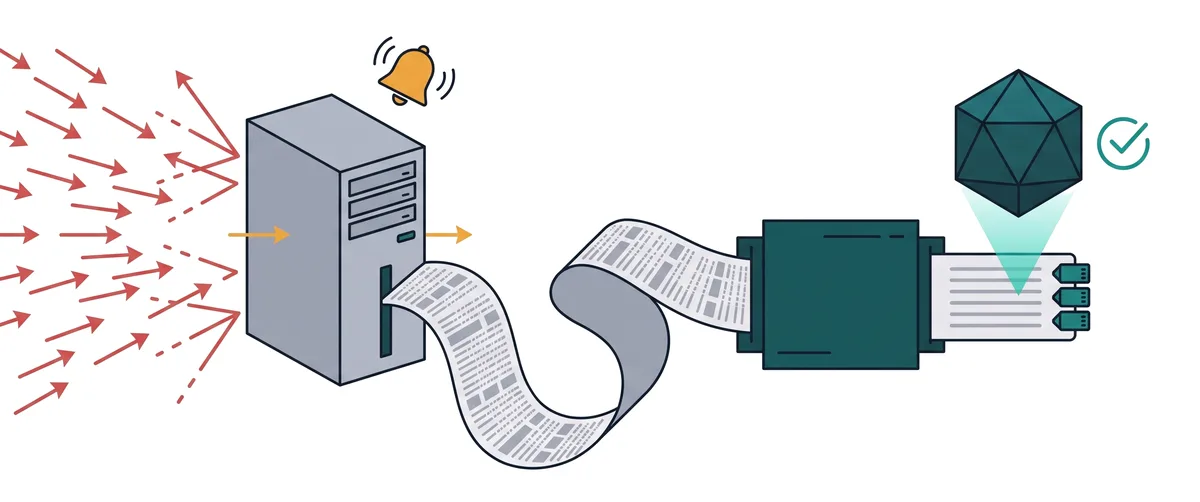
Picture the most ordinary alert in a Windows estate. A burst of failed logons hits a server, Windows event 4625 over and over, and then one logon succeeds, event 4624, on the built-in Administrator account, outside working hours. Every SOC has a rule for this pattern. Every SOC has also had to decide, at some point, whether the success at the end of it was an attacker or an administrator who mistyped a password six times.
This year that decision is increasingly being handed to an AI agent first. Most security plans for 2026 carry the same new line: put agents on triage. The AI-native SOC is moving from aspiration to early reality, and autonomous triage and remediation now sit on CISO priority lists. The mandate is real, and the budget conversations around it are real.
What almost nobody has priced is what the agent has to read. The agent does not see the alert the way a dashboard draws it. It sees the events underneath, as text, and it pays for every character of them.
An agent reads logs the way your SIEM bills them
Your SIEM charges by volume. Depending on the vendor that means by the gigabyte ingested, by the host, or by the compute it takes to search. You know this bill well because it arrives every month and grows with every new source.
A large language model, the engine inside an AI agent, charges by volume too. Its unit is the token, a chunk of text that is often a short word or part of a longer one. Every token that goes into the model’s context window costs money and takes up room. The context window is the model’s working memory: the text it can see at once while it reasons. It is large, but it is finite, and everything in it competes for the model’s attention.
So every field in every event your agent reads either helps the investigation or crowds it out. A field nobody needs is not free just because the SIEM already stored it. It is paid for again each time an agent opens the event.
One logon, measured
Rather than argue this in the abstract, we took the most checkable example we could find: the sample Windows logon event, ID 4624, that Microsoft publishes in its own documentation. Anyone can open that page and copy the same XML.
As raw XML, exactly as Microsoft publishes it, the event is 710 tokens.
We then kept only the fields an analyst actually uses to judge a logon: when it happened, on which host, which account, which domain, what kind of logon, which authentication package, which process, from which address, whether the session was elevated, and the logon ID that ties it to what happened next. We turned the numeric codes into words. That version is 131 tokens.
Finally we added the context an analyst would otherwise go and look up: that the host is a file server, that this is a high-value built-in admin account, and that the logon happened outside working hours. With that context the event is 152 tokens.
The cleaned and enriched event is about a fifth of the raw one, and it tells the agent more than the raw one did, because the three facts that make this logon suspicious are now written into it instead of left for the agent to infer.
How we counted: the open-source tiktoken tokenizer, o200k_base encoding. Other model families split text differently, so your exact ratio will differ, but the direction holds for any tokenizer, because the removed text is real text that any model has to read.
What came out, field by field
None of what we removed is secret, and none of it is wrong. It is simply not evidence for this question. In the raw event:
- The schema and provider boilerplate. The XML namespace, the provider GUID, version, level, task, opcode and keywords. They describe the format of the record, not the logon.
- Empty fields. Transmitted services, the LAN Manager package name, restricted admin mode and the outbound account fields all read
-for this logon. An empty field still costs its name, its quotes and its tags. - An all-zero ID. The logon GUID is
{00000000-0000-0000-0000-000000000000}, which Microsoft documents as the value when the GUID was not captured. - The reporting account. The subject fields describe the machine account that wrote the event,
WIN-GG82ULGC9GO$, not the person who logged on. Because the subject is usually SYSTEM, Microsoft recommends reporting this event whenever the subject is anything else. - Unresolved codes. Values such as
%%1833and%%1842are message-table references. An agent either looks them up, which costs another round trip, or guesses, which costs accuracy. A pipeline resolves them once. - Record plumbing. Event record ID, process and thread IDs of the logging service, the correlation activity ID. Useful to the Windows event log, not to triage.
None of this has to be deleted from your organization to be kept away from your agent. The full raw event still belongs somewhere you can reach it, for the auditor and for the investigation that really does need every byte. That distinction matters enough that we wrote a whole piece on it: reduction is not data loss.
The failures cost more than the success
The single 4624 at the end of the pattern is the cheap part. The burst before it is where the volume is. Each failed logon, event 4625, arrives as its own record with its own boilerplate, its own empty fields and its own unresolved codes, and a password spray or a brute force produces them in bursts.
An analyst does not read each failure. They read the shape: how many, from where, against which accounts, over what window, and whether one of them succeeded. An agent handed the raw records has to rebuild that shape by reading every one of them first. An agent handed a pipeline’s summary, one record that says how many failures came from which source against which account in which window, starts where the analyst starts.
This is the difference between a pipeline that only trims fields and one that also aggregates. Trimming makes each event cheaper. Aggregation turns many events into one fact. Both happen once, in flight, before anything is indexed or read.
Noise gets paid for three times
When noisy events reach an agent unchanged, the cost shows up in three places.
- In the SIEM bill. The noise was ingested, indexed and stored, and paid the SIEM’s price per gigabyte or per host on the way in. Our piece on routing before you index covers this part of the bill in detail.
- In tokens. Every time an agent reads the event, it pays for the boilerplate, the empty fields and the codes again. An investigation that touches the same host’s logons ten times pays ten times.
- In time and quality. A context window full of noise holds fewer events. In our sample, nearly five times as many cleaned events fit in the same window as raw ones. Fewer events per question means more round trips, slower answers, and a higher chance that the one record that mattered fell outside the window the agent could see.
The third cost is the one budget owners miss, and it is the one that decides whether the agent is any good. An agent that has to page through raw events in small batches is slower and less accurate than the same agent reading a clean, complete picture in one pass.
Why not let the agent do the filtering
The obvious objection: modern agents are capable, so hand them the raw events and let them ignore what does not matter.
The trouble is that an agent ignores text by reading it. To decide that the logon GUID is empty, it has to receive the logon GUID. To decide that %%1833 means impersonation, it has to look it up or know it. The filtering happens after you have already paid for the tokens and spent the room in the context window.
And it happens again on every run. Ten agents, or one agent asked ten questions, each repeat the same filtering on the same events. A pipeline does the work once, deterministically, with rules you can read, test and version. The agent then spends its tokens on the part only it can do: reasoning about whether this logon is an attacker.
There is a governance argument too. A filter you wrote is a control you can show an auditor. A model deciding on its own, run by run, which fields to pay attention to is much harder to explain after the fact.
Clean once, in front of everything
This is the idea behind the Logmetry Blueprint:
- Raw telemetry. Every log at full price, as it leaves the source.
- Pipeline. Cost control and telemetry enrichment, in front of the SIEM. Fields that nothing reads come out, codes are resolved, bursts are aggregated, and context is added.
- SIEM. Only what detection needs, so detections keep firing on a smaller stream.
- Your data lake. The clean, enriched copy, in your own cloud account, in a format you control.
- AI agents. Full enriched context for triage, read from the lake.
- Compliance archive. The full raw copy, kept in low-cost storage for audit and for the investigation that needs every byte.
The cleaning happens once, so the SIEM, the lake and the agents all get the benefit of the same work. Nothing is thrown away, because the raw copy is kept. And the pipeline sits in front of your SIEM, never instead of it.
Where the context comes from
The three facts we added to the logon were not invented by a model. In a real pipeline each one comes from a system you already own.
- Host role comes from your asset inventory or CMDB: this machine is a file server, owned by this team, in this environment.
- Account value comes from your identity system: this is the built-in Administrator, or a member of a privileged group, or a service account that should never log on interactively.
- Working hours come from a calendar or a simple rule per site and team.
The pipeline joins those facts onto the event in flight. That is what enrichment means here: not more data, but the right data, attached where the agent will read it. It is also why the enriched event is only 21 tokens longer than the clean one while carrying the three facts that make it worth investigating.
Shape and volume are two different problems
Cleaning reduces how much an agent reads. Normalization fixes how it reads. When the same failed logon arrives from Windows, from Okta and from Microsoft Entra ID, each in its own dialect, the agent spends its context translating before it reasons. Our earlier piece on the parsing tax covers that side: mapping events to an open schema such as OCSF so every source speaks the same language.
The two compound. A pipeline that trims, enriches and normalizes in one pass hands the agent fewer tokens, in one shape, with the context already attached. That is the foundation the rest of the AI program stands on.
Keep the agent on a short leash
Clean data does not make an agent trustworthy by itself. The controls that make agentic triage defensible are the ordinary ones, applied deliberately.
- Read-only access. The agent reads from the lake. It does not hold credentials to change your estate.
- People review what it proposes. Containment, account resets and firewall changes go to a person for approval before anything changes.
- A record of what it looked at and why. Which events it read, which it ignored, and how it reached its verdict, kept where your auditors can see it.
That is oversight a CISO can explain to an auditor and to a board. It is also easier to build on clean data, because a trace of an agent reading 152 tokens is far easier to review than a trace of it reading 710.
What we don’t know yet
One event is a demonstration, not a benchmark. A real estate mixes firewall, DNS, cloud, identity and endpoint data, and each cleans differently. Some sources shrink a great deal, some barely at all, and the context you can add depends on how good your inventory and identity data are.
So we are building a lab to measure it properly: the same agent, the same simulated attack, run once on raw data and once on clean, enriched data, with the tokens, the time and the verdicts recorded side by side. We will publish what it shows, including if the gap turns out smaller than this sample suggests.
Questions to ask your team this quarter
If an agent is on your triage roadmap, these are worth an hour before anyone signs for more tokens or more SIEM capacity.
- What exactly will the agent read: raw events from the SIEM, or something cleaner?
- Which of our highest-volume event types carry fields no detection and no analyst uses?
- Where would host role, account value and working hours come from today, and how long would an analyst take to look them up?
- If we had to show an auditor why the agent ignored a field, could we?
- Where is our full raw copy, and could we replay it if we needed to?
If the answers are uncomfortable, that is normal, and it is the cheapest point at which to fix them. We are happy to walk through them with your team. Start a conversation.